| Software Music Machine Archive |
|
AP Tuner v3.08
Download from the |
Operating System:
File Size:
1.3 MB
License:
License Conditions: Registration: US$35.00 System Requirements: Sound card, Microphone (or adapter if connecting directly to electric instrument) Last Updated: 2008-08-12
For more detail about software : Software Description
|
View AP Tuner v3.08 Screenshot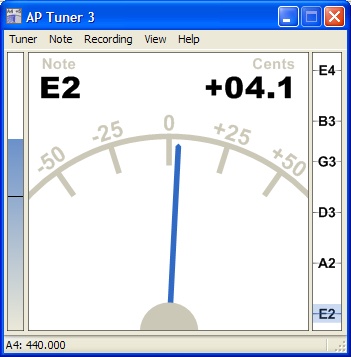 |
Software Description
AP Tuner is a highly accurate and responsive instrument tuner developed for use with a computer. Care has been taken to make the software as simple and functional as possible. Even with this goal in mind there are some areas that need extra explanation and detail to use the tuner to its full potential. The latest version supports an improved detection algorithm for low notes for bass and piano. The application can now handle custom temperament and stretch tables. Finally a new "Harmonics Graph" window has been added to visualize harmonic content over time.
Quick Start Guide
- Start tuner application (tuner.exe). Plug the microphone into the microphone input on the sound card. Launch the Recording Control Application (menu: Recording | Windows Recording Control). Select the microphone as the input control and adjust the volume slider for the microphone to maximum volume. Close the Recording Control Application window.
- In the tuner application the main window shows the Energy Indicator on the left side which displays the current volume of the recording device. When playing the instrument near the microphone, the audio level should rise.
- Left click on the energy indicator to select the minimum level that the tuner will use to start note detection. This should be slightly lower than the volume shown when the instrument is played at normal loudness.
- Now that the tuner is properly setup to detect notes, play a note on your instrument. The tuner will track this note until the volume goes below the minmum level. The text under “Note” will show the closest half step to the note detected. The number under “Cents” will show the number of cents away from the closest half step. The center window will display the current note played and its cent deviation as text and as a needle.
- You are now ready to tune your instrument!
Main tuner window
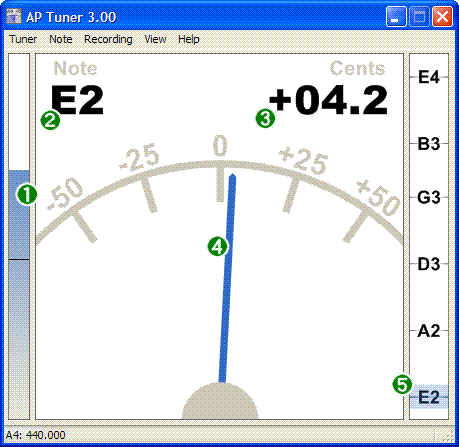
- Energy Indicator : Energy level of the current sound card input
- Note detected : Latest note detected displayed as the closest half step
- Cent offset text : Cents off from closest half step shown in textual form
- Cent offset needle : Cents off from closest half step shown in graphical form
- Global Tuning Indicator: Note shown with respect to a set of notes called "Note Presets"
Related Hardware:
Acoustic Guitar Tuners

precision
I am using APTuner to research anharmonicity of classical guitar strings and need to get a stable read-out of how many cents each fret departs from the exact pitch. The display is too jittery for that and gives an uncertainty of at least 2 cents and sometimes 3. I need precision of of no worse than 1 cent and 0.1 cent would be ideal. I need a patch to achieve this
editing presets?
how do i ad E-flat to the note preset option, i mean, i'm really new to guitar, and don't know much about playing in general, never mind using aptuner to it's full potential, but i'd like to know how can i add different tuning options in the preset menu, besides drop C and standard E? do i just give the tunning a name and spell the notes in the side bar?
Works with USB plugged into guitar
I just plugged my guitar into my computer using my usb cable, turned the guitar volume up and the tone knobs down. It works perfectly! Thanks for this software. I use a Korg tuner when away from my laptop, but it isn't as accurate for slight changes.
Tuning presets
I try to add more tune pers presets, you may read more there
http://devolf.livejournal.com/4465.html
How do I tune to half step?
Is there a way to set it up for half step?
Best Tuner in the World!
This is hands down the most responsive tuner I have ever used. I have traveled the globe and have found nothing that even remotely competes. I would definately pay $30-40 for this application. ROCK ON AP TUNER and thanks to developer Joe Broms for all his hard work to make this free app possible.
The best instrumental tuner!
Ive searched the internet for weeks looking for a decent tuner. FINALLY I found aptuner. I don't care if it's 5 years old still by far the best tuner out there.
I use a drop D 5 string bass and getting a tuner that could properly recognize A0, has been impossible until i found aptuner
People Like you are Awesome!!!
I'm a decent musician and have some pretty good tuners. With the world going hi tech via laptop, its really nice to have this tool already loaded on board alongside my recording software. If its just me, my guitar and my laptop... everything I need is right there. Your product is Top Notch bro! I cannot believe all those people make such harsh comments. A big Thank You from me Anyways!
Bass 5 string
whats shape for bass 5 string , (standard E) ???
i tune first B0 and next
i tune first B0 and next like standard E. [ B0, E1, A1, D2, G2 ]
Heres the setup for drop
Heres the setup for drop c:
C2, G2, C3, F3, A3, D4
hope that helps.
thank you anon
thank you anon
Always stay on top
In 3.08 there is no option "always stay on top" in the GUI, but you can manually edit tuner_config.xml to "AlwaysOnTop true /AlwaysOnTop".
READE .flv
What is the .flv? Why not the .exe? When I find the README or HELP of this program?
In the Linux version also don't have any information how setup the program. I try click on the executable file, but nothing happen. Have some tutorial? Thank you;
Windows XP Service Pack 3
AP Tuner 3.06 does not work with Service Pack 3. You should use AP Tuner 3.08 instead. http://www.aptuner.com
where i can download a old version?
i think that the old versions, are more useful, because have more tunings!
Re: where i can download a old version?
: i think that the old versions, are more useful, because have more tunings!
Bullshit
I like the old one also because it has way more tunings. The fact that the new one doesn't have any tunings I want, it is bullshit!
Re: where i can download a old version?
yes, i prefere the old one, too!
Re: where i can download a old version?
http://rhythm.harmony-central.com/~ftp/software/windows/guitar-bass/apguitargsetup.exe
heres a direct link to downloas ap guitar tuner version 1.02
dude..you're the man
the newest versions ap tuner 3.06 and 3.08 just crashed on start up after installation..
I was looking for the old version I used to have and that I had lost... and I saw your link...
it wen't right into the file.. downloaded, installed, works like always.. beautiful.. thanks man!!
dudes like you make the internet the same as what the US is for ilegal immigrants.. a Place full of oportunities!!
priceless!!!
Also runs great under linux
I am using it under Linux running with Wine and it has absolutely no flaws I can detect.
I've been using the Free one for a while, but I'm probably going to shell out the cash for this one.
$$$
Joseph,
$35 for your tuner is way too high considering you can buy a portable electronic tuner (Korg, etc.) for $25 or less.
Portable tuners
Your very right that there are many portable tuner that cost less than the shareware price of the AP Tuner. My goal of the tuner was to provide a rock solid instrument tuner that will give you unparalleled performance and accuracy. I think for the most part, it beets the competition, hands down. Its major downfall is it not very portable. For some people, this is no big deal. College students in dorms like it because its free to try and they all have computers in their rooms, newbiees like it because most tuners have no idea what an octave is, and some people like as a extra peice to their mini-studio. You have to ask yourself is it worth the $35 dollars to you. If not, then just use it unregistered. I propursely made the unregistered version with no restrictions on time or features, because I who only kinda like it to still get to use it. I you find in ten years that you can't live without it, then pay for it then.
Also, I have been contemplating making the tuner as portable device, more for the satisfaction of making something superior in quality to technolodgy today. I know it would be fairly expensive, because you just cant produce a $25 tuner without being a mega-corporation with super cheap parts. It would be a niche high-end product. If anyone thinks thats a cool idea, drop me a message at tuner@springnet1.com
Joseph Broms
Re: Portable tuners
Hey there Joe I have had your tuners in verious versions loaded in my lap top for years now! very portable and useful for me anyway! 35 bucks is pretty spendy how about tracking down a sponser to pay for some of your costs? most of us aspiring music folks are of a low income nature hard to budget guitar strings even but hey if no one eles says it I will thanks for your efforts all the way!
Adware
I know alot of people don't like the whole shareware concept, but let me explain what I think of shareware. I think most people think of shareware as evaulation, for some product. Many shareware programs work this way, by disabling features after a period of time, or making you sit through a dialog for minutes to start the prorgam. I don't think of shareware as an evaluation, but as something free to use for as long as you like, but if you find it worth more than the suggested price, to consider paying for it. If you don't think it is worth x dollars to you, then don't pay for it...just keep using it! For me, the thrill of knowing that people are finding utility out of something I made is worth more than extra money I could make from it. Sure, I'd love to get some money back for the time I spent on it, but that is very secondary. So for all the poor college student musicans out there, don't worry about paying for it, I'd rather you enjoy it, than be forced to use something else.
As for the adware concept, I just cringe as the through of placing a blinking advertisment on the tuner. I have spent alot of time making the main tuner window as functional and visually pleasing as possible, and would rather not add extra stuff to the sides.