| Software Music Machine Archive |
|
Copyist v8.0
Download from the |
Operating System:
File Size:
2.3 MB
License:
License Conditions: Registration: US$99.95 System Requirements: 64 MB RAM, 16 MB hard disk space Last Updated: 2009-01-04
For more detail about software : Software Description
|
View Copyist v8.0 Screenshot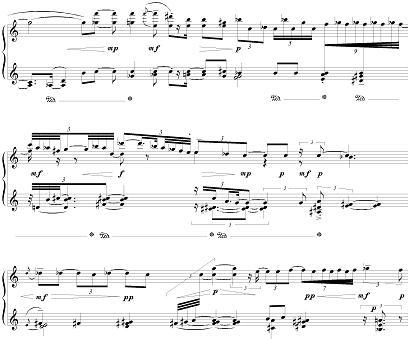 |
Software Description
Copyist is music notation software that lets you create with ease tricky musical examples that more expensive and complicated programs trip over their feet trying to reproduce.
Because Copyist treats notes, staves, clefs and other musical characters as graphical elements, you've got the freedom to put musical objects on the page regardless of musical rules. This freedom allows you to easily create small excerpts to be included in work that is predominantly text, as well as very complex scores which are difficult to create using software which must follow musical rules.
Copyist works with your existing QuickScore files, giving you the power to fine-tune any score created in our award-winning music composition software QuickScore Elite or QuickScore Elite Level II simply by saving your work as a Copyist file and loading it into Copyist.
Copyist lets you save your scores as .BMP, TIFF, .EMF or .EPS files so that you can incorporate them into your Microsoft Word, Corel WordPerfect, Corel Draw, Adobe Illustrator, Adobe PageMaker and many other types of documents with a few mouse clicks.
Features:
- Unlimited staves
- 5-line and single-line staves
- 6, 5 and 4-string tablature staves for guitar, bass, banjo, ukulele, mandolin, bouzouki, pipa, etc.
- Complete set of symbols including groupings, fingerings, articulations, slurs, repeats, crescendos, decrescendos, dynamics, line, circle and box drawing
- All standard clefs including 5-line and single-line percussion clefs
- Grace notes and cue notes
- Configurable chord names, 6, 5 and 4-string tablature chord grids and figured bass
- 4 and 7 shape note system note heads, drum note heads and other non-standard note heads
- Custom note heads
- Complete guitar and harp symbol set
- Custom symbols · Import graphics
- Complete control over placement of all symbols
- Fully adjustable beam height and slant
- Cross-staff and split beams
- Unlimited voices per staff
- Any number of lyrics in any font
- Any amount of text for titles, composer, headers, footers, copyright in any font
- Comprehensive set of editing commands including Cut, Copy, Paste, Move and Adjust
- Multiple undo
- High quality WYSIWYG TrueType music font included
- High-quality printout on all Windows supported printers.

Old Dr.T's music files
I have some old Copyist files with .ME extent, that I would like to resurrect. How can I do that? I have Copyist programs versions 2.5 and 3.0, but they cannot open these .ME files, which I think were created with an even earlier version of Dr.T's music software back in 1989 and 1990.
Any help will be appreciated.
New Copyist 6.0
I work with Copyist V2.0 and Quickscore Professional 4.0 to get handwritten notes onto computer and printer. Is this version of Copyist on input as convenient as QuickScore. My computer run windows XP.
file conversation
i have been using the dos version for many years and it has served me well. how can i convert my old dos based files so that i can get better quality publishing quality printouts?
i can convert to tiff and eps but they don't seem to be handled well by word processing programs. i got "multiple media manager" which convert on file type to another, but it does not recognize the eps files and the tiff files are copacted and it is time consuming trying to "stretch" them to fit into wordperfect.
can you offer any direction or assistance.
thanks
rupert