| Software Music Machine Archive |
|
H3D v2.1.2
Download from the |
Operating System:
File Size:
25.18 MB
License:
Price: EUR 99 License Conditions: In evaluation mode, automations and reverb parameters are disabled, and the plugin will periodically be silent. System Requirements: VST2.4 compatible host, OpenGL 1.2.1 capable graphic chipset Last Updated: 2012-09-03
For more detail about software : Software Description
|
View H3D v2.1.2 Screenshot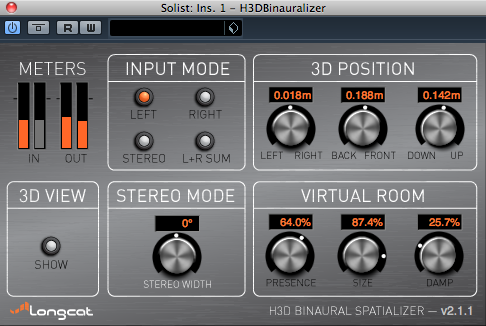 |
Software Description
The H3D binaural spatializer plugin allows you to 3D mix audio tracks and to obtain incredible spatialization effects.
It's aimed at musicians or podcast producers, H3D inserts in major PC and Mac audio workstations (Cubase, Live, Pyramix, Nuendo, Reaper...) and displays all audio sources in a simple, visual 3D interface that is easy to manipulate.
Features:
- 3D object-audio mixing - use the 3D interface to place and easily animate sounds
- Longcat Audio H3D technology - when listening on headphones, H3D allows panning sound in 3D all around the listener's head.
- Unique HRTF processing - H3D uses Longcat own processed HRTF filters in order to achieve the best spatialization effects.
- H3D Presence - independently adjust H3D's immersion effect using the Presence parameter.
- H3D Reverb - new 3D reverberation parameters (H3D v1.1 or better)
- Automation - fully automate parameters and 3D animation of audio tracks.
- No tedious settings - Just insert H3D plugins and start moving sounds in 3D!
New in v2.1.2
- Bugfix for sound clicks issue
New in v2.1.1
- Spatialize stereo tracks
- Brand-new 3D and plugin interface
- Pro Tools 10 support
- enhances the frontal stability of sources
- General stability improvements.
New in v1.1.2
- ProTools 8 & 9 support on Mac OS X and Windows.
- The binaural process was revised in order to add as little coloration as possible to the processed tracks.
- Support for Sample Rates up to 192 kHz.
- General stability improvements.
