| Software Music Machine Archive |
|
SplineEQ 1.2
|
|
Operating System:
File Size:
3.6 MB
License:
License Conditions: The free version only has up to 4 bands as opposed to up to 60 bands. Also the free version cannot open or save presets. Full version = $19 System Requirements: VST/AU host application. Last Updated: 2015-11-03
For more detail about software : Software Description
|
View SplineEQ 1.2 Screenshot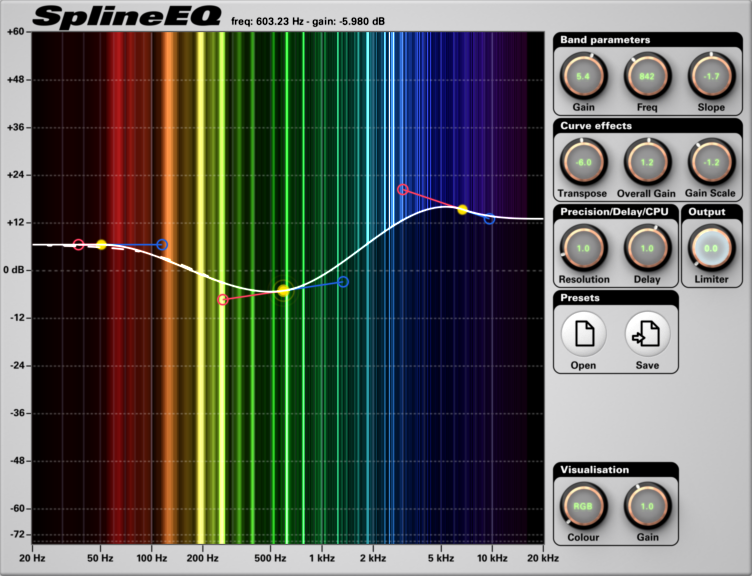 |
Software Description
SplineEQ is a linear phase equalizer plug-in that is based on spline curve design.
Since SplineEQ utilizes linear phasing, it does not affect the phase of sound and only changes the intensity of frequencies. This gives you results that do not color the sound and incur aliasing artifacts. You can set it up to have up to 60 bands - the demo only has 4 - for complete equalizer control over your audio.
Features:
- Simple curve modification functions - overall gain, gain scale and transpose
- Smooth and fluid interface
- Frequency analyser
- Infinite dB to +60 dB gain range
- Multiple presets
- Control over resolution, latency and CPU usage
- Smooth transitions
Changes in v1.2:
- New stereo visualization mode in which the colour of a band indicates its position in the stereo mix.
- Preset buttons look different in preparation of more interface changes in the near future.
Changes in v1.1.2:
- Bugfix for wrong sized interface on each first instance of the plugin.
- Changed the way FFT sizes are chosen for more granularity in choosing a Resolution/Delay parameter.
Changes in v1.1:
- Bugfix for 64-bit VST on Mac
- Visualization range can go from +60/-infinite dB to +/- 3 dB with Vertical zoom
- Added horizontal zoom up to 10x controlled via mouse wheel.
- New GUI and 48-bit colour depth with dithering
- Selectable interface size in 3 sizes, 780x566, 1060x566 and 1220x666
- Latency reporting method changed for better latency compensation in some hosts
- Changed the way resolution and delay are calculated and extended the maximum resolution to 16 (equivalent to ~16,000 bins at a 44.1 kHz sampling rate)
Changes in v1.0.9:
- Changed and improved Limiter
Changes in v1.0.7:
- Improved Knob display with a new color scheme and a larger and sharper font.
- Improved knob display accuracy by adjusting decimal values based on position.
Changes in v1.0.5:
- The way slopes are defined is changed to linear instead of angular when the mouse cursor is on the same side of the handle control.
- The text on the knob is a bit sharper for improved readability.
- Mono in-mono out support added
- ChangedDefault intensity of the spectral visualisation
- Fixed some minor bugs
