| Software Music Machine Archive |
|
iStroboSoft v1.40.00
|
|
Operating System:
File Size:
1 MB
License:
Price: USD 9.99 License Conditions:
System Requirements: Runs on iPhone, iPod touch, and iPad. Requires iOS 3.1 or later. Last Updated: 2012-08-20
For more detail about software : Software Description
|
View iStroboSoft v1.40.00 Screenshot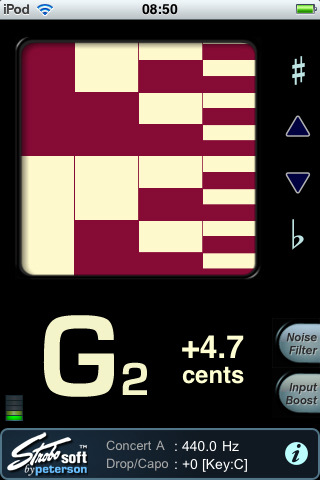 |
Software Description
Plug in and tune your electric and acoustic guitars quickly and easily with 1/10th cent accuracy. (External mic required for iPod touch.)
Features:
- Exclusive strobe display allows you to achieve an unmatched level of accuracy.
- Note/Octave window displays the correct note and octave for the note being tuned.
- Cents display allows you to see how far out of tune your note is in cent values.
- Glowing flat/sharp indicators assist when tuning a note very far from the target position and it is difficult to gauge which direction the strobe is moving.
- Noise filter: Use the noise filter when utilizing an external mic or clip-on tuning device to help reduce the effect of extraneous environmental noise during tuning.
- Input boost: The input boost will raise all input frequencies by +24dB.
- Calibration mode: iStroboSoft can be calibrated to an external source guaranteeing 1/10th cent accuracy.
- Drop/Capo mode: iStroboSoft will auto-transpose notes up or down to one full octave.
- Full screen mode permits the strobe display to be maximized on screen to allow better viewing from a distance.
- Adjustable Concert A: Change the Concert A reference of the tuner to accommodate tuning to a fixed instrument, such as a piano, or tune instruments that do not utilize the typical Western A440 reference.
Changes in v1.40.00
- Improved note detection code for better low note tracking due to iOS device filtering.
- Added: Auto or manual note select. Can toggle between auto and manual note select (just touch the "auto/man" label).
- Added: Display options. Can toggle to show: cents, Hz, MIDI note.
- Option to not show tenths of cents (in settings, "show whole cents").
- Flat and sharp lights have been changed so there are almost invisible until activated.
- Added: Can now change Concert A and Drop/Capo from the main screen (touch and drag on value).
- Improvements for retina display. Newer high-resolution graphics now available.
- New look/feel by changing the case color. When "black" is selected, it goes back to the original "classic" look.
