| Software Music Machine Archive |
|
vKiP 1.1.0
|
|
Operating System:
File Size:
1.3 MB
License:
Price: USD 39.99 License Conditions:
System Requirements: iPad with iOS 3.2 or later, Symbolic Sound Kyma x.75 with Paca or Pacarana sound design engine running latest firmware, WiFi access to same network Paca(rana) is connected Last Updated: 2011-02-09
For more detail about software : Software Description
|
View vKiP 1.1.0 Screenshot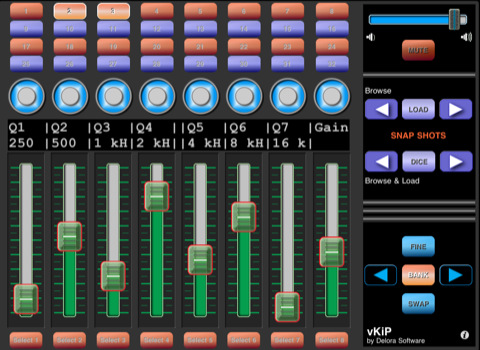 |
Software Description
Control Symbolic Sound’s Kyma X Paca or Pacarana sound design system using your iPad!.
Conveniently arranged on one screen, vKiP's controls are optimized in size and layout for the iPad Multi-Touch screen. Adjust faders and rotaries, browse and load in Kyma sound snapshots, plus more! Untether yourself from the computer mouse and screen.
vKiP adjusts for either portrait or landscape orientation, giving you the flexibility to choose your preferred usage mode.
vKiP is Harmony Systems' latest in its Delora Software family of "v" applications that expand the controller options for Kyma. It uses WiFi and "Midi over OSC" to communicate with Kyma: no other computer "agent" programs, drivers, or utilities are needed. vKiP can be used with any computer and OS supported by Kyma.
Features:
* Manipulate and set Kyma sound parameters through faders and rotaries optimized for touch-screen control
* Control eight faders and eight rotaries at a time
* Full VCS bank support
* Swap fader and rotary controls
* Control parameters with normal or fine adjustment mode
* Browse or load-in Kyma sound snapshots
* Adjust Kyma’s master volume or mute all sound
* View current parameter values using Selector buttons
* Supports systems with one or multiple Paca(rana)s
New in v1.1.0
-
Two new preference settings offer enhanced control and interaction:
- "JUMP TO TOUCH": when this preference is set ON any touch within a fader channel will cause the fader to immediately "jump" to that value.
- "CONTROL TOUCH SHOWS VALUE": when this preference in ON, while you touch a rotary or fader the LCD displays the corresponding fader and rotary full-length labels, and their current values.
